## 引子
前些日子裡正好有機會主持一些小課程,
主要是針對 docker 和 git 這些開發工具的一些介紹。
由於過程中會用到大量命令行,
在課後檢討時我總懷疑學員們會不會其實看不太清楚前排螢幕上的操作?
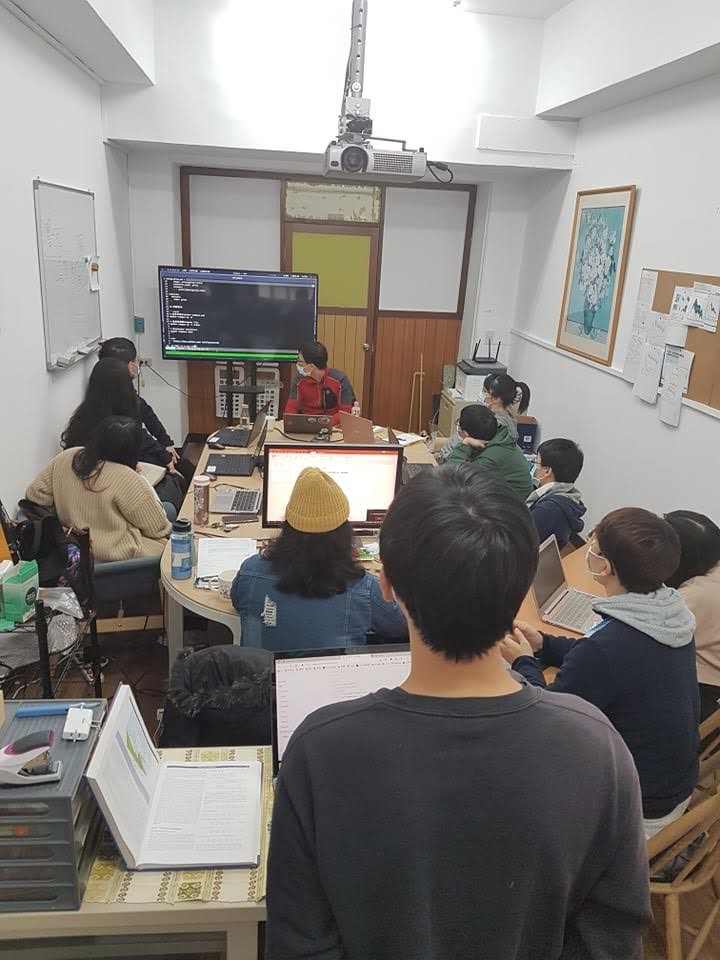
好吧...很顯然對後排來說字真的很小...
在每個人都有筆電的課堂上,最好的方式當然是讓他們用自己的螢幕來觀看整個操作過程。
現在這個時代, VNC 之類的螢幕共享工具應該已經相當成熟。
但是我除了沒有使用經驗以外,
要求每個學員都裝上同樣的軟體可能也不太現實。那麼問題來了:
> **有沒有什麼方法可以快速分享命令行操作呢?**
既然要把目前使用者與 Shell 的互操作(Session) 分享出去,
第一個想到的工具當然是 tmux!
## tmux 的唯讀模式
使用 tmux ,可以讓當前的使用者在不同的登入狀態下快速 attach 到同一個 session 。
不過這就帶來了一個問題: 既然我們只是要展示操作,當然不希望學員們能夠在 session 下進行任何操作!
所幸 tmux 在設計時早就考慮到了這一步,在 attach 時,使用參數 `-r` 可以讓使用者進入唯讀模式。
該模式下除了輸入 ` + D` 離開 tmux 之外無法進行任何操作:
```bash
# 以唯讀模式進入名為 "demo" 的 session
tmux attach -t demo -r
```
## SSH 的登入設定
既然我們可以輕輕鬆鬆搞定唯讀模式,那麼就該處理使用者的問題了。
tmux 在預設狀態下[^1], session 是無法被不同的系統使用者共享的。
學員們首先需要登入我的使用者帳號,才可以用唯讀模式啟動 tmux 觀察我操作的 sesssion。
哇靠!登入我的使用者帳號!?這怎麼想都很不對勁啊。
為了透過 tmux 的唯讀模式把 session 分享出去,我們是不是又暴露了更嚴重的漏洞?
雖然我可以為了教學專門建立一些一次性的帳號,但預設情況下[^2],它們始終是可以執行 tmux 以外的指令的。
要是學員們不小心執行了一些預期外的操作,要收拾這個爛攤子就很麻煩了。
幸好,所謂的「登入」並不是一定要和當前使用者的 login shell 互動,
我們可以透過 SSH 連線直接執行指令,不需要在 login shell 下多打一次指令:
```bash
# 登入後,直接執行指令和其參數 'command arg1 arg2'
ssh : command arg1 arg2
```
所以學員們可以直接執行以下指令,觀看我在遠端主機所分享的,名為 `demo` 的 tmux session:
```bash
# 登入後,直接執行 tmux 的唯讀模式
ssh : tmux attach -t demo -r
```
不過,既然學員們可以用 SSH 執行指定的 command ,自然也可以帶起 login shell 或其它指令。
我們仍無法完全預防可能發生的誤操作!
好在為了這種情況, **sshd** 這套 SSH Server 早就有相應的設計了(其實我也是最近才知道),
遠端主機不只可以在 `~/.ssh/authorized_keys` 文件中設定允許登入的金鑰,
還可以設定使用該金鑰登入時,使用者「唯一」能執行的指令。
有關這點,可以查閱手冊找到相關說明:
```txt
$ man sshd 8
...
Public keys consist of the following space-separated fields: options,
keytype, base64-encoded key, comment
...
command="command"
Specifies that the command is executed whenever this key is used for authentication. The command supplied by the user
(if any) is ignored. The command is run on a pty if the client requests a pty; otherwise it is run without a tty. If
an 8-bit clean channel is required, one must not request a pty or should specify no-pty. A quote may be included in
the command by quoting it with a backslash.
This option might be useful to restrict certain public keys to perform just a specific operation. An example might be
a key that permits remote backups but nothing else. Note that the client may specify TCP and/or X11 forwarding unless
they are explicitly prohibited, e.g. using the restrict key option.
...
```
因此,用以下的型式撰寫金鑰紀錄,可以限制使用者登入時只能使用唯讀模式執行 tmux :
```ini
# For DEMO with tmux
command="tmux attach -t demo -r" ecdsa-sha2-...
```
## All Together!
有了以上的思路,該做什麼就很清楚了:
1. 在遠端主機上建立一個名為 "demo" 的 tmux session
2. 在遠端主機上建立一對金鑰。撰寫金鑰紀錄時,只允許該金鑰的使用者用唯讀模式執行 tmux 來連接到 demo
3. 把私鑰給學員,讓他們用該私鑰登入主機。如此即可自動進入 tmux ,觀察到我的命令行操作
步驟很簡單,實作也相當容易:
```bash
# 登入遠端主機,假設我們名叫 teacher ,主機位於 1.1.1.1
ssh teacher@1.1.1.1
# 在 tmux 中建立名為 "demo" 的 session
tmux new -s demo -d
# 在 ~/.ssh 中,建立基於橢圓曲線的公私鑰,取名叫 tmux-to-demo
ssh-keygen -t ecdsa -f ~/.ssh/tmux-to-demo
# 在 authorized_key 中,用剛剛產生的公鑰新增一筆紀錄
# 限制該金鑰的使用者登入時,僅能以唯讀模式執行 tmux
<>~/.ssh/authorized_keys
command="tmux attach -t demo -r" $(cat ~/.ssh/tmux-to-demo.pub)
RECORD
# 寄信給學員,附上私鑰作為附件,並告知使用步驟
mutt student@gmail.com \
-s 'Join our demo' \
-a ~/.ssh/tmux-to-demo \
<$IDENTITY_FILE
-----BEGIN OPENSSH PRIVATE KEY-----
...
...
...
-----END OPENSSH PRIVATE KEY-----
KEY
# 用私鑰執行 SSH 連線,並把使用者目前 shell 所連接的 tty 作為標準輸入
當然,以上步驟我是有實驗過的。
執行本站提供的腳本: http://demo.topo.tw 後,可以隨時登入我的 VPS ,進入 tmux 中名為 "demo" 的 session。
讀者可以實際用以下指令執行看看。當然,在唯讀模式下您是無法進行任何操作的:
```bash
# 我的 tmux 設定中, 鍵被設定為 (Ctrl + G)
# 因此,退出時請按 再按 D
curl demo.topo.tw | sh
```
[^1]: 實際上 tmux 可以指定 Socket file 並讓有讀取權限的使用者進入到相關聯的 session 。不過這個方法除了設定權限外,學員仍須登入遠端主機的其它使用者帳號。
[^2]: Restricted Shell (rsh) 可以限制使用者切換目錄和改變環境變數 PATH 。因此在 `/etc/passwd` 中將它設定為 login shell ,並把使用者的 PATH 變數設定改掉,該使用者能夠執行的指令將大大減少。